Convert Any PDF to Google Sheets in Seconds
Stop manual copy-pasting. Pick your PDFs directly from Google Drive, define your spreadsheet columns, and let AI stream structured data rows into your active spreadsheet.

Traditional PDF Converters vs. Scrape2Sheets AI
Standard converters try to reconstruct visual coordinates and break on variable layouts. Vision AI reads document context and extracts only the columns you specify.
Traditional PDF Converters
- Dumps all table text into single cells or scrambled columns
- Fails on scanned paper PDFs or phone photos
- Requires manual copy-pasting or CSV downloading for every file
- Breaks when document layouts vary between suppliers
Scrape2Sheets AI Extraction
- Extracts exact target columns directly into Google Sheets
- Multimodal Vision AI handles scanned PDFs and receipt photos seamlessly
- Parallel batch processing — convert up to 100 PDFs in one click
- Context-aware — extracts structured fields regardless of layout
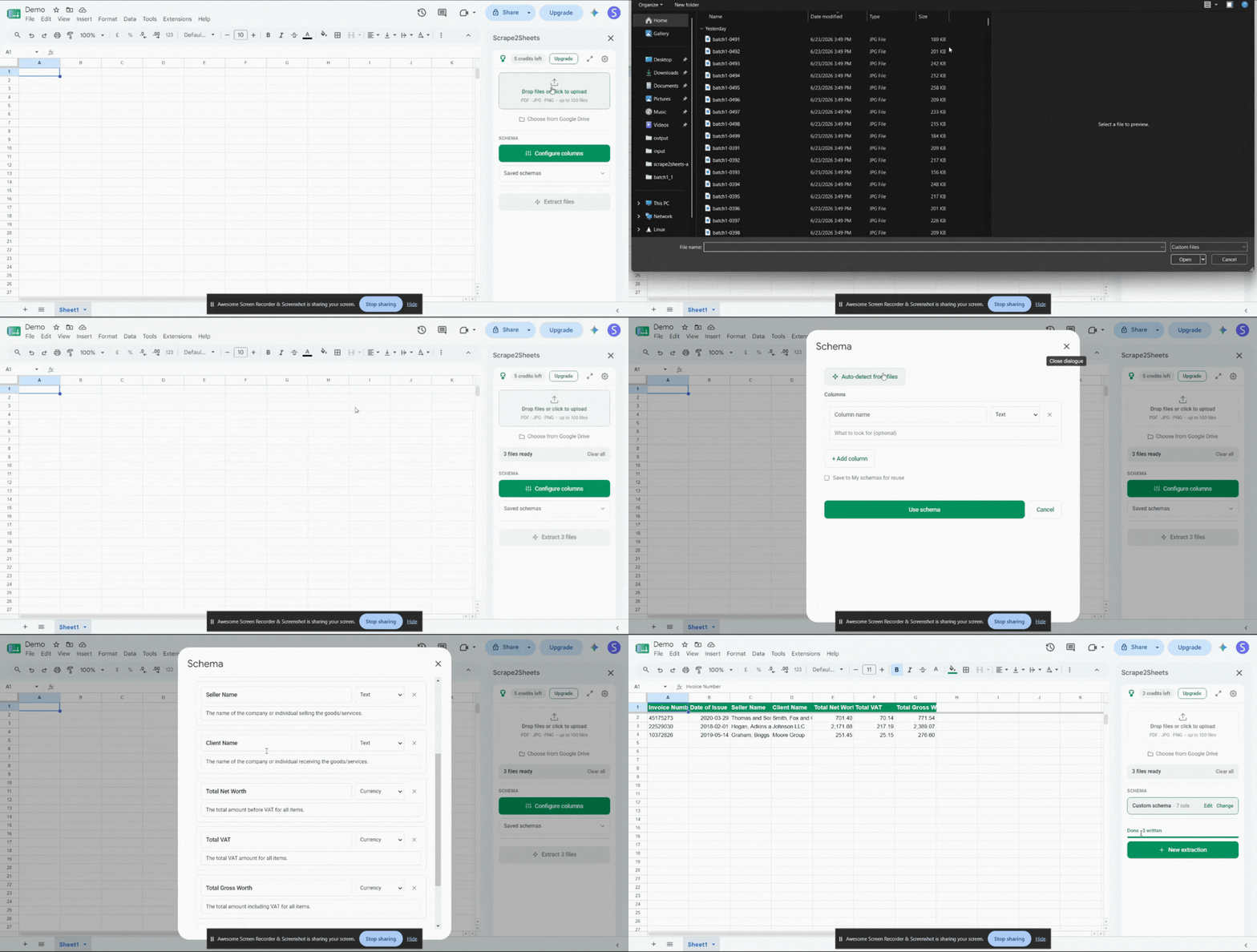
How to Convert PDF to Google Sheets in 3 Steps
Extracting structured PDF data into spreadsheet rows directly inside Google Sheets.
Select PDFs from Drive
Launch Scrape2Sheets inside Google Sheets. Use the Google Drive picker to select up to 100 PDFs or image files directly from your cloud storage.
Set Column Headers
Define the data columns you want (e.g. Date, Vendor, Amount, Tax) or click AI Auto-Detect to infer column names from a sample document.
Stream Data into Sheets
Hit Extract. Vision AI processes your PDF files in parallel and streams clean, formatted rows into your active spreadsheet tab in real-time.
What PDFs Can You Convert to Google Sheets?
Any structured or semi-structured PDF document can be converted into spreadsheet rows.
Invoices & Bills
Extract Vendor, Invoice Date, Line Items, Tax, and Total Amount out of supplier PDFs.
Invoice GuideBank Statements
Convert transaction tables into clean ledgers with Date, Description, Debit, Credit, and Balance.
Bank Statement GuideReceipts & Expenses
Digitize receipts, thermal paper scans, and phone photos into organized expense reports.
Receipt GuideForms & Resumes
Parse job applicant CVs, legal forms, purchase orders, or custom surveys into structured tables.
Get Add-onFrequently Asked Questions
Everything you need to know about converting PDFs into Google Sheets with Scrape2Sheets.
Ready to Convert Your PDFs to Google Sheets?
Install Scrape2Sheets today. Get 5 free pages on install — no credit card required.
Install Scrape2Sheets FreeNo credit card · No setup · Cancel anytime